Xcode Cloud testing for React Native: build a UITest target from scratch
A React Native project ships with no native test target. Here is a verified path: build the UITest target from the command line with the xcodeproj gem, pass a smoke test locally, add a Test action in Xcode Cloud. Plus the three build settings the gem forgets and Xcode sets automatically.
For a React Native project running tests in Xcode Cloud, the first hurdle isn't CI configuration — it's that the project has no native test target at all. The iOS project RN generates by default ships with only one app target, and even the Test Action in the scheme may point to a blueprint that doesn't exist (an orphan reference). So you have to first create a UI Test Bundle target from scratch, get a smoke test passing locally, and only then let Xcode Cloud's Test action run it.
This article documents a verified end-to-end loop: create a UITest target from the command line with the xcodeproj gem (no Xcode GUI clicking) → get smoke green locally → add a Test action in Xcode Cloud → first green run in the cloud. Plus the 3 build-settings traps that the gem does not auto-set during target creation but the Xcode GUI does.
Diagnose first: do you actually have a test target
Don't trust "it looks like it's there in Xcode". Query project.pbxproj directly:
# Count NativeTargets
grep -c "isa = PBXNativeTarget" ios/YourApp.xcodeproj/project.pbxproj
# Inspect what the scheme's TestAction references
grep -A2 "TestAction" ios/YourApp.xcodeproj/xcshareddata/xcschemes/*.xcscheme
An RN project has only 1 PBXNativeTarget by default (the app), but the scheme's TestAction may still carry a BlueprintName = "YourAppTests" — the corresponding target was sanitized or deleted during a migration, leaving only the reference behind. That's the orphan: the moment Xcode Cloud's Test action runs, it reports it can't find the test target.
Conclusion: build from zero.
Why create the target from the command line (not the Xcode GUI)
Creating it via the GUI is the most stable path, but it's not reproducible and not version-controllable. The second person on the team, or a different machine, has to click through it all again. The xcodeproj gem turns "create target" into a committable script — idempotent, diffable.
The cost: a target built by the gem does not auto-set several build settings that the GUI sets automatically — that's the root cause of the 3 traps below.
Create the target (xcodeproj gem script)
require 'xcodeproj'
project = Xcodeproj::Project.open('ios/YourApp.xcodeproj')

app = project.targets.find { |t| t.name == 'YourApp' }
abort 'app target not found' unless app

test = project.new_target(:ui_test_bundle, 'YourAppUITests', :ios, '15.1')
test.add_dependency(app)
test.build_configurations.each do |c|
  c.build_settings['PRODUCT_BUNDLE_IDENTIFIER'] = 'com.yourcompany.YourAppUITests'
  c.build_settings['TEST_TARGET_NAME']          = 'YourApp'      # the app under test
  c.build_settings['DEVELOPMENT_TEAM']          = 'YOUR_TEAM_ID'
  c.build_settings['CODE_SIGN_STYLE']           = 'Automatic'
  c.build_settings['SWIFT_VERSION']             = '5.0'
end

# smoke test source file reference (create the physical file first)
group    = project.main_group.new_group('YourAppUITests', 'YourAppUITests')
file_ref = group.new_file('YourAppUITests.swift')
test.add_file_references([file_ref])
project.save

# scheme: test action = UITests, launch = app
scheme = Xcodeproj::XCScheme.new
scheme.add_build_target(test)
scheme.add_build_target(app)
scheme.add_test_target(test)
scheme.set_launch_target(app)
scheme.save_as('ios/YourApp.xcodeproj', 'YourAppUITests', true)
Key points: TEST_TARGET_NAME points at the app under test (the UI test runner needs to know which app to launch); use :ui_test_bundle, not :unit_test_bundle (UI tests use the former).
★ The big trap: 3 build settings the gem doesn't auto-set
Once the script finishes and pod install completes, the first xcodebuild test hits the traps. When you create the target via GUI, Xcode auto-fills these 3; the gem doesn't.
### Trap 1 · Missing Info.plist → code sign failure
Cannot code sign because the target does not have an Info.plist fileWhen you create a target via GUI, Xcode auto-sets GENERATE_INFOPLST_FILE = YES (synthesizes the plist at build time). The gem doesn't, so signing can't find the plist and fails.
c.build_settings['GENERATE_INFOPLST_FILE'] = 'YES'
c.build_settings['CURRENT_PROJECT_VERSION'] = '1'
c.build_settings['MARKETING_VERSION']       = '1.0'
### Trap 2 · RN codegen script leaks into the test target → product conflict
error: Multiple commands produce '.../YourAppUITests-Runner.app/PlugIns/YourAppUITests.xctest'Cause: React Native's codegen stuffs a PBXShellScriptBuildPhase (a run-script phase) into the target. If the gem-built test target inherits this phase, it clashes with the test runner's default product path and the product gets duplicated.
Fix: after creating the target, delete the shell script build phases that leaked onto it:
test.shell_script_build_phases.each { |p| test.build_phases.delete(p) }Or, directly in the pbxproj, remove the isa = PBXShellScriptBuildPhase section under the test target.
### Trap 3 · PRODUCT_NAME empty → .xctest product name wrong
Multiple commands produce '.../PlugIns/.xctest' # note the empty name before .xctestA gem-built target may not explicitly set PRODUCT_NAME, leaving the product name empty.
c.build_settings['PRODUCT_NAME'] = '$(TARGET_NAME)' # or explicitly 'YourAppUITests'All three traps share one root cause: the "auto-finishing" the Xcode GUI does when creating a target, the gem leaves to you manually. Run xcodebuild test once, fix each error as it appears — once patched, it's stable.
Smoke test: the app launches without crashing
The first smoke test doesn't test features, it only verifies the pipeline: the app can launch in the simulator, reach the main screen, and not crash.
import XCTest

final class YourAppUITests: XCTestCase {
    func testAppLaunches() throws {
        let app = XCUIApplication()
        app.launch()
        let appeared = app.buttons.firstMatch.waitForExistence(timeout: 10)
            || app.staticTexts.firstMatch.waitForExistence(timeout: 5)
        XCTAssertTrue(appeared, "app should have an interactive element after launch")
    }
}
Why buttons.firstMatch || staticTexts.firstMatch: an RN first screen may be pure JS rendering, so the native layer's first frame may have no button, but it will always have text. A 10s + 5s double wait covers cold launch.
Podfile: the test target block
After the main target block, add:
target 'YourAppUITests' do
  inherit! :search_paths
end
inherit! :search_paths makes the test target inherit only the main target's search paths (headers / frameworks), not re-link pods — otherwise you get duplicate symbols. Then cd ios && pod install.
Get it green locally
cd ios
xcodebuild test \
  -workspace YourApp.xcworkspace \
  -scheme YourApp \
  -destination 'platform=iOS Simulator,name=iPhone 15' \
  -only-testing:YourAppUITests
A TEST SUCCEEDED means the local pipeline is OK.
In the cloud: add a Test action in Xcode Cloud
1. App Store Connect → your app → Xcode Cloud → workflow (listening on master/branch) 2. Add a Test action in the Actions section (keep the existing Archive action) 3. Configure: - Scheme: pick your UITests scheme (not the app scheme — the latter's Test Action is an orphan reference and won't run) - Destination: iPhone simulator - Environment: leave empty for now (smoke only) 4. Save
⚠️ Critical: builds triggered by a push before you add the Test action run Archive only. You must add the Test action, then trigger a fresh build for tests to run. An already in-flight build will not retroactively run tests.
Result
First cloud build with a Test action: TEST SUCCEEDED, total time including Archive about 7 minutes. Xcode Cloud's Test action only runs XCTest / XCUITest (the native layer), not jest — RN's JS unit tests need separate setup (e.g. a jest job on GitLab CI running in parallel).
In production: 4 simulators in parallel, smoke all green
Ran this pipeline end-to-end on a real RN project: the UITest scheme's TestAction configured with Release configuration, the smoke case testAppLaunches only verifying the app launches and doesn't crash. After push, Xcode Cloud auto-triggered, the Test action ran in parallel across 4 destinations (iPhone SE / 16 / 16 Pro / 16 Pro Max), all green.
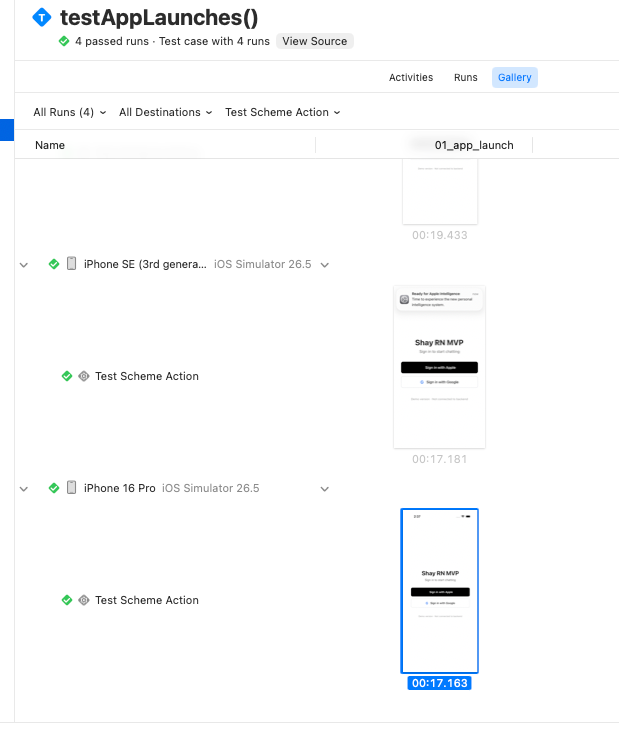
Three non-obvious points hit in practice:
- Release configuration runs UITest on Cloud. Locally on a real device, Release hits
test bundles not available in Release configuration, but Xcode Cloud's split build-for-testing / test-without-building mode is fine — just configure the TestAction with Release directly. - Screenshots are not kept by default — you have to explicitly preserve them. XCTest attachments default to
.deleteOnSuccess— once the test passes, they're cleared, producing "passed but no image". Change to.keepAlwaysso they land in the .xcresult, where the Gallery tab and Xcode Organizer can see them. - Screenshots are not under the Artifacts tab. Artifacts only lists build products (Logs / Test Products / .xcresult.zip); attachments are resources inside the .xcresult bundle. To view them, go to Tests → Gallery, or download the .xcresult and export with
xcrun xcresulttool export attachments.
Advanced: gate BDD with an environment variable
Smoke is the baseline, runs every time. But real-device BDD (UI interactions, business flows) is time-consuming and eats quota, so it shouldn't run on every build. Convention: gate it with an environment variable.
import XCTest

final class YourAppBDDTests: XCTestCase {
    func testLoginFlow() throws {
        // BDD suite is gated by RUN_BDD; smoke is not gated (baseline layer always runs)
        try XCTSkipIf(ProcessInfo.processInfo.environment["RUN_BDD"] != "true",
                      "BDD skipped (saves quota by default; set RUN_BDD=true to run)")
        // ... real BDD steps
    }
}
The cloud workflow's Environment does not set RUN_BDD by default (every run is smoke only); when you need to verify interactions/business, temporarily add RUN_BDD=true and trigger once. Spend quota where it counts.
Debug checklist
Cannot code sign ... does not have an Info.plist→ setGENERATE_INFOPLST_FILE = YESMultiple commands produce ...-Runner.app/PlugIns/...xctest→ remove the codegenPBXShellScriptBuildPhasefrom the test targetMultiple commands produce .../PlugIns/.xctest(name empty) → setPRODUCT_NAME- Test action reports test target not found → the scheme's TestAction is an orphan reference; create a new UITests scheme and select it
- Cloud build didn't run tests → didn't re-trigger a build after adding the Test action (old builds don't retroactively run)
- Simulator destination not found → use a model the cloud image actually has (e.g.
iPhone Air), not a freshly-released model the image hasn't updated to yet xcodebuild testtakes a long time to compile → RN's first full compile is about 10 minutes, that's normal, let it run in the background