Xcode Cloud 给 React Native 跑测试:从 0 命令行建 UITest target
RN 项目默认没有原生测试 target。一条已验证的链路:命令行用 xcodeproj gem 建 UITest target → 本地跑 smoke 绿 → Xcode Cloud 加 Test action → 云端首次跑通。以及 gem 不会自动设、Xcode GUI 会自动设的 3 个 build settings 大坑。
React Native 项目在 Xcode Cloud 里跑测试,第一道坎不是 CI 配置,而是项目里根本没有原生测试 target。RN 默认生成的 iOS 工程只有一个 app target,连 scheme 里的 Test Action 都可能指向一个不存在的 blueprint(孤儿引用)。所以你得先从 0 建一个 UI Test Bundle target,本地跑通 smoke,再让 Xcode Cloud 的 Test action 跑它。
本文记录一条已验证的链路:命令行用 xcodeproj gem 建 UITest target(不用点 Xcode GUI)→ 本地跑 smoke 绿 → Xcode Cloud 加 Test action → 云端首次跑通。以及建 target 过程中 gem 不自动设、而 Xcode GUI 会自动设的 3 个 build settings 大坑。
先诊断:你到底有没有测试 target
别靠"Xcode 里看着有"。直接查 project.pbxproj:
# 看 NativeTarget 有几个
grep -c "isa = PBXNativeTarget" ios/YourApp.xcodeproj/project.pbxproj
# 看 scheme 的 TestAction 引用什么
grep -A2 "TestAction" ios/YourApp.xcodeproj/xcshareddata/xcschemes/*.xcscheme
RN 项目默认只有 1 个 PBXNativeTarget(app),但 scheme 的 TestAction 里可能挂着一个 BlueprintName = "YourAppTests"——对应的 target 已被 sanitize 或迁移删掉,只剩引用。这就是孤儿:Xcode Cloud 的 Test action 一跑就报找不到 test target。
结论:从 0 建。
为什么用命令行建 target(不用 Xcode GUI)
GUI 建最稳,但不可复现、不可版本控制。团队里第二个人、或换台机器,又得点一遍。xcodeproj gem 能把"建 target"变成一个可提交的脚本,幂等、可 diff。
代价:gem 建出来的 target,有几个 GUI 会自动设的 build settings 它不自动设——这就是后面 3 个坑的根源。
建 target(xcodeproj gem 脚本)
require 'xcodeproj'
project = Xcodeproj::Project.open('ios/YourApp.xcodeproj')

app = project.targets.find { |t| t.name == 'YourApp' }
abort 'app target 未找到' unless app

test = project.new_target(:ui_test_bundle, 'YourAppUITests', :ios, '15.1')
test.add_dependency(app)
test.build_configurations.each do |c|
  c.build_settings['PRODUCT_BUNDLE_IDENTIFIER'] = 'com.yourcompany.YourAppUITests'
  c.build_settings['TEST_TARGET_NAME']          = 'YourApp'      # UITest 要测的 app
  c.build_settings['DEVELOPMENT_TEAM']          = 'YOUR_TEAM_ID'
  c.build_settings['CODE_SIGN_STYLE']           = 'Automatic'
  c.build_settings['SWIFT_VERSION']             = '5.0'
end

# smoke 源文件引用(物理文件先建好)
group    = project.main_group.new_group('YourAppUITests', 'YourAppUITests')
file_ref = group.new_file('YourAppUITests.swift')
test.add_file_references([file_ref])
project.save

# scheme:test action = UITests,launch = app
scheme = Xcodeproj::XCScheme.new
scheme.add_build_target(test)
scheme.add_build_target(app)
scheme.add_test_target(test)
scheme.set_launch_target(app)
scheme.save_as('ios/YourApp.xcodeproj', 'YourAppUITests', true)关键点:TEST_TARGET_NAME 指向被测 app(UI test runner 要知道启动哪个 app);用 :ui_test_bundle 而不是 :unit_test_bundle(UI 测试用前者)。
★ 大坑:gem 不自动设的 3 个 build settings
脚本跑完、pod install 完,一 xcodebuild test 就撞坑。GUI 建 target 时这 3 个 Xcode 自动填,gem 不会。
### 坑 1 · 缺 Info.plist → code sign 失败
Cannot code sign because the target does not have an Info.plist fileGUI 建 target 时 Xcode 自动设 GENERATE_INFOPLIST_FILE = YES(构建时合成 plist)。gem 不设,于是签名找不到 plist,挂了。
c.build_settings['GENERATE_INFOPLIST_FILE'] = 'YES'
c.build_settings['CURRENT_PROJECT_VERSION'] = '1'
c.build_settings['MARKETING_VERSION']       = '1.0'
### 坑 2 · RN codegen 脚本泄进 test target → 产物冲突
error: Multiple commands produce '.../YourAppUITests-Runner.app/PlugIns/YourAppUITests.xctest'原因:React Native 的 codegen 会往 target 塞 PBXShellScriptBuildPhase(启动脚本)。gem 建的 test target 如果继承到这个 phase,它和 test runner 默认的产物路径打架,产物重复。
修:建完 target 后删掉它上面混进来的 shell script build phase:
test.shell_script_build_phases.each { |p| test.build_phases.delete(p) }或直接在 pbxproj 里把 test target 下 isa = PBXShellScriptBuildPhase 的段去掉。
### 坑 3 · PRODUCT_NAME 空 → .xctest 产物名错
Multiple commands produce '.../PlugIns/.xctest' # 注意 .xctest 前面名字空了gem 建的 target 可能没显式设 PRODUCT_NAME,产物名落空。
c.build_settings['PRODUCT_NAME'] = '$(TARGET_NAME)' # 或显式 'YourAppUITests'这三个坑是同一个根因:Xcode GUI 建目标时的"自动收尾",gem 留给你手动。 跑一次 xcodebuild test,按报错一个个补齐——补完就稳了。
smoke 测试:app 能启动不崩
第一个 smoke 不测功能,只验证链路:app 能在模拟器启动、进了主屏、没崩。
import XCTest

final class YourAppUITests: XCTestCase {
    func testAppLaunches() throws {
        let app = XCUIApplication()
        app.launch()
        let appeared = app.buttons.firstMatch.waitForExistence(timeout: 10)
            || app.staticTexts.firstMatch.waitForExistence(timeout: 5)
        XCTAssertTrue(appeared, "app 启动后应有可交互元素")
    }
}
为什么用 buttons.firstMatch || staticTexts.firstMatch:RN 首屏可能是纯 JS 渲染,原生层第一帧可能没 button,但一定有 text。给 10s+5s 双重等待,覆盖冷启动。
Podfile:test target 块
主 target 块之后加:
target 'YourAppUITests' do
  inherit! :search_paths
end
inherit! :search_paths 让 test target 只继承主 target 的搜索路径(headers / frameworks),不重复 link pods——否则重复符号。然后 cd ios && pod install。
本地跑通
cd ios
xcodebuild test \
  -workspace YourApp.xcworkspace \
  -scheme YourApp \
  -destination 'platform=iOS Simulator,name=iPhone 15' \
  -only-testing:YourAppUITests
跑出 TEST SUCCEEDED = 本地链路 OK。
云端:Xcode Cloud 加 Test action
1. App Store Connect → 你的 app → Xcode Cloud → workflow(监 master/分支) 2. Actions 区加一个 Test action(已有的 Archive action 保留) 3. 配置: - Scheme 选你的 UITests scheme(不是 app scheme——后者的 Test Action 是孤儿引用,跑不了) - Destination:iPhone 模拟器 - Environment:先不加任何东西(只跑 smoke) 4. Save
⚠️ 关键:加 Test action 之前 push 触发的 build 只跑 Archive。必须加完 Test action 后再触发一次新 build,才会跑 test。已 in-flight 的 build 不会补跑。
结果
首次带 Test action 的云端 build:TEST SUCCEEDED,连同 Archive 总耗时约 7 分钟。Xcode Cloud 的 Test action 只跑 XCTest / XCUITest(原生层),不跑 jest——RN 的 JS 单测要另配(比如用 GitLab CI 的 jest job 并行跑)。
实测:4 个模拟器并行,smoke 全绿
把这条链路在一个真实 RN 项目上跑通:UITest scheme 的 TestAction 配 Release configuration,smoke 用例 testAppLaunches 只验 app 起得来不崩。push 后 Xcode Cloud 自动触发,Test action 在 4 个 destination(iPhone SE / 16 / 16 Pro / 16 Pro Max)并行跑,全绿。
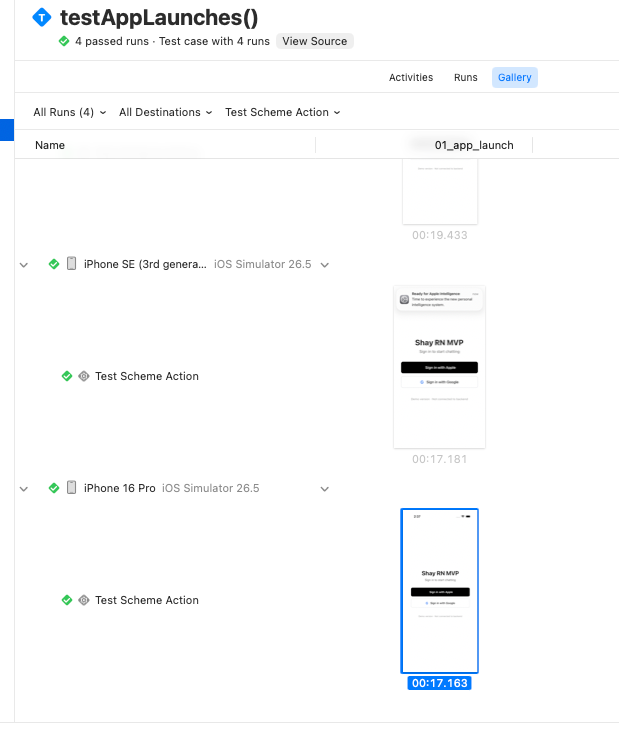
三个实测踩到的非显然点:
- Release configuration 在 Cloud 上能跑 UITest。本地真机用 Release 会撞
test bundles not available in Release configuration,但 Xcode Cloud 的 build-for-testing / test-without-building 分离模式没事,TestAction 直接配 Release 即可。 - 截图默认不留,得显式保活。XCTest 的 attachment 默认
.deleteOnSuccess——测试一过就清,出现"过了但无图"。改成.keepAlways才会进 .xcresult,Gallery 标签和 Xcode Organizer 才看得到。 - 截图不在 Artifacts 标签。Artifacts 只列打包产物(Logs / Test Products / .xcresult.zip),attachment 是 .xcresult 包内资源。看它要去 Tests → Gallery,或下载 .xcresult 用
xcrun xcresulttool export attachments导出。
进阶:用环境变量门控 BDD
smoke 是基线,每次都跑。但真机 BDD(UI 交互、业务流程)耗时长、占配额,不该每次 build 都跑。约定用环境变量门控:
import XCTest

final class YourAppBDDTests: XCTestCase {
    func testLoginFlow() throws {
        // BDD 套件用 RUN_BDD 门控;smoke 不门控(基线层永远跑)
        try XCTSkipIf(ProcessInfo.processInfo.environment["RUN_BDD"] != "true",
                      "BDD 跳过(默认省配额,要跑加 RUN_BDD=true)")
        // ... 真实 BDD 步骤
    }
}
云端 workflow 的 Environment 默认不设 RUN_BDD(每次只跑 smoke);要验证交互/业务时临时加 RUN_BDD=true 触发一次。配额花在刀刃上。
调试 checklist
Cannot code sign ... does not have an Info.plist→ 设GENERATE_INFOPLIST_FILE = YESMultiple commands produce ...-Runner.app/PlugIns/...xctest→ 删掉 test target 上的 codegenPBXShellScriptBuildPhaseMultiple commands produce .../PlugIns/.xctest(名字空)→ 设PRODUCT_NAME- Test action 报找不到 test target → scheme TestAction 是孤儿引用,建新 UITests scheme 并选它
- 云端 build 没跑 test → 加 Test action 后没重新触发 build(旧 build 不补跑)
- 模拟器 destination 找不到 → 用云端镜像实际有的型号(如
iPhone Air),别用刚发布、镜像还没更的型号 xcodebuild test编译很久 → RN 全量编译首次约 10 分钟,正常,转后台等